A button, a text box, a form. To someone who remembers early Windows business software, that combination can bring back an entire working day: entering orders, checking inventory, printing a report. The useful lesson is not that the interface was charming. It is that more people could turn a business problem into something that worked.
Visual Basic changed the distance between understanding a problem and constructing a solution. Today's AI builders should study that distance before promising to eliminate it.
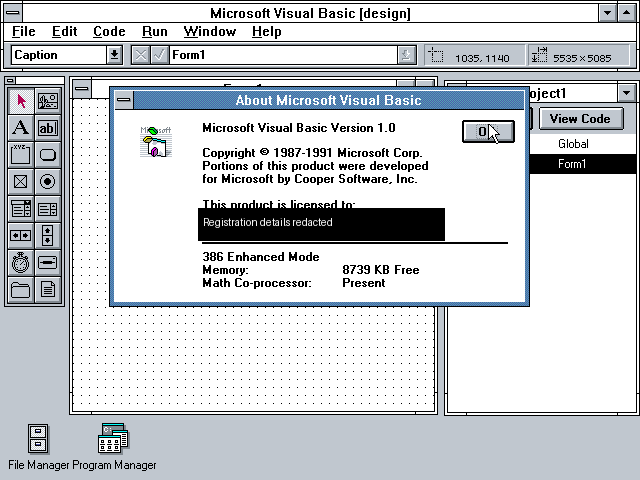
Historical image: Visual Basic 1.0, showing its toolbox and form behind the About dialog. Microsoft copyright 1987–1991; archival screenshot and source. Registration details redacted. A limited historical illustration—not a screenshot taken in 1991 and not an endorsement.
What became easier—and what did not
The Microsoft announcement reproduced by former Visual Basic team member Paul Vick is dated May 20, 1991. It describes graphical interface construction, event-driven programming, a Windows executable compiler and integrated debugging. It also distinguishes announcement from availability: the release said the product would be available in June. “Introduced in May” is not the same as “shipping in May.”
The important separation was between laying out the interface and writing its behavior. A developer could place familiar Windows controls visually, then write the code that responded to a click or other event. That removed repetitive interface plumbing. It did not remove the need to decide what an order meant, which fields were required, or who could change a price.
That distinction still matters. Generating an attractive screen is progress. It is not evidence that the underlying process is correct.
Business problems were there from the start
The launch announcement names corporate programmers, consultants, independent software vendors and casual programmers. It describes corporate business systems, utilities, data front ends and integration between Windows applications. Business utility was not an accidental discovery after the product became popular.
Imagine a small distributor with an order backlog. The person who knows the problem may understand three exceptions that the official process diagram misses: a customer requiring a reference number, a supplier with variable lead times, and a product that cannot ship without a compliance document. A useful application makes those distinctions visible and enforceable.
The construction tool matters because it lets the builder spend more attention on those distinctions. Accessibility is not merely fewer lines of code. It is a shorter feedback loop between the person who understands the exception and the system that handles it.
Read the original promise critically
The reproduced release describes a forms engine incorporating technology acquired from Cooper Software, context-sensitive help, examples, debugging and extensible controls. Those ingredients formed a working environment, not just a language.
It also contains enthusiastic endorsements and a customer's claimed development-time reduction. Those are statements in Microsoft's promotional announcement, not independent proof that every team achieved comparable results. They should not be borrowed as evidence of what an AI builder will save today.
A proposed August 1991 BYTE advertising archive could not be verified during preparation of this series. Rather than reproduce an unverified advertisement or invent its wording, this article links to the historical reproduction of Microsoft's launch announcement. It is a 2006 reproduction of a dated 1991 document, not a currently hosted Microsoft original.
The lesson for AI-assisted construction
An AI assistant can help produce code, explain a requirement or draft a procedure. That moves some construction work closer to the business problem-solver. It also introduces uncertainty: a generated answer can sound complete while being wrong.
A deterministic validation rule and a model's recommendation are different kinds of output. A required customer ID can be checked exactly. A judgment about whether an unusual contract clause needs legal review is contextual and should not quietly become an approval.
NoodleNet's opportunity is to connect those different kinds of work while preserving their boundaries. Its current Pro environment includes a Build application, project/task records and an event-reporting surface. That does not establish that every integration, deployment target or governance policy is already implemented. Product direction must be demonstrated one working path at a time.
Try the construction test before choosing a builder
Choose one small process and write down five things:
- The person who understands the problem and the person accountable for its outcome.
- The input record and the system that owns it.
- One ordinary case and two exceptions.
- What can be checked exactly and what requires human judgment.
- What evidence would prove that the result was accepted—not merely generated.
Now ask a builder to demonstrate that process. Can you inspect the validation? Can an operator understand a failure? Can the responsible person reject the output? Does the result remain connected to its source record?
This exercise is useful even without AI. It prevents a polished interface from hiding an unfinished operating model.
Keep the human advantage
Visual Basic is a useful analogy for making construction more approachable, not a promise that operational AI is just drag-and-drop programming. AI systems bring additional questions about information access, uncertainty, evaluation and ongoing operation.
The ambition is not to automate away the person who understands the business. It is to extend that person's reach. Don't automate the human. Extend the human.
Next step: take one recurring exception from your business and apply the construction test. Explore NoodleNet with that example in hand rather than a generic request for an AI demo.